-
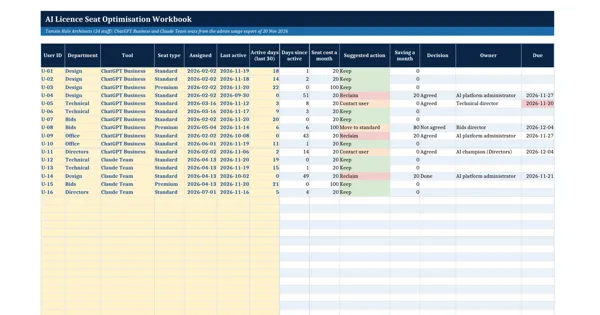 Excel workbook preview
AI Tools, Vendors and Costs
AI Licence Seat Optimisation Workbook
3 downloads per free account, no card needed.
Who this is for
The renewal is coming and the finance director asked why the company pays for AI seats that people do not use.
What is inside
- 16 sample users with last active date and active days, plus 24 blank rows
- Suggested action by formula: Reclaim, Move to standard, Contact user or Keep, from thresholds on Settings
- Monthly saving per seat calculated from seat type prices
- Decision, owner and due date columns with overdue in red
- Summary of purchased, assigned, unassigned and active seats, utilisation and annual savings
- Earliest change date taken from each plan's renewal date
How to use it: Paste your workspace usage export into Seats, set your thresholds and prices on Settings, and agree each suggested action with the user's manager before removing a seat.
Files & formats
- XLSXai-licence-seat-optimisation-workbook.xlsx17 KB
Opens in Microsoft Word or Excel, Google Docs or Sheets and LibreOffice. Delivered instantly from your browser.
Free downloads & full access
Every account gets 3 free downloads. Re-downloading a template you already have does not count. This template on its own is $17.99, and buying it keeps your free downloads for something else. Full access is a one-time $249 for all 300 templates, for life.
Bought with a different email? Open your account and enter your order number.
Licence
Use and adapt the document inside your own organisation or for your own clients. Do not resell or republish the templates themselves. These templates are original working documents built on the public guidance named here. They are not legal or contractual advice and are not endorsed by its publisher. Guidance changes: check the current official text.